Graceful Switchover (GS)
- Deepika Kumar (Deactivated)
- Vijayganesh Sivaprakasam
- Jakub Sejba
2. Graceful Switchover - Command Line Interface
The Graceful Switchover command is part of the "dbvctl -o" command options. For more detail on using this command run: "./dbvctl -o -h"
Example:
[oracle@dbv1 standby]$ ./dbvctl -h -o

    dbvctl -d <ddc> -o status
    dbvctl -d <ddc> -o start|stop|restart [--database]
    dbvctl -d <ddc> -o open|read [--database]
    dbvctl -d <ddc> -o ro_test
    dbvctl -d <ddc> -o activate [--force] [--noprompt]
    dbvctl -d <ddc> -o dr_test [--backup --backup_type image|backupset --backup_location bck_dir] [--noprompt]
    dbvctl -d <ddc> -o reinstate [--switch] [--noprompt]
    dbvctl -d <ddc> -o switchover [--logswitch]
    dbvctl -d <ddc> -o update_ddc_file|update_dbenv_file
    dbvctl -d <ddc> -o upgrade [--noprompt] [--force]

    start            Startup instance or database
    stop             Shutdown instance or database
    status           Display status of instance or database
    restart          Restart instance or database
    open|read        Open the standby database read only
    ro_test          Open standby read only and restart
    activate         Activate standby database
    dr_test          Activate standby as DR test with optional backup
    reinstate        Reinstate standby from a backup
    switchover       Perform Graceful Switchover
    update_ddc_file  Reverse variables in a ddc file
    upgrade          Upgrade the ddc file to the latest version
    --database       Apply option to the whole database rather than an instance (RAC)
    --nosync         Add SYNCH_DBVISIT_INSTALL = No to ddc file on completion
    --logswitch      A number of logswitches to perform during GS (for test purposes)
    --noprompt       No confirmation prompts in CLI mode
    --switch         Switch standby to image copy when reinstating
    --force          For upgrade: upgrade DDC even if its version is up to date
                     For other options: No interactive prompt


    dbvctl [-d <ddc>] -o setup [--nolic] [--noprompt] [--mode CLI|GUI] [--action new|install|uninstall] [-j json_file]

    --nolic          Do not display license text
    --noprompt       No confirmation prompts
    --mode           CLI default
    --action         Used by GUI only
    --json           Json file in GUI mode
From the above, we can see that the Graceful Switchover command is: ./dbvctl -d <DDC> -o switchover
You only have to execute this command on one of the servers (primary or standby). It is recommended to use the primary.
In the following example, we perform a Graceful Switchover for the DEV database running on dbv1 (primary) and dbv2 (standby):
2.1. Examples
The Graceful Switchover process for a single instance environment compared to an Oracle RAC configuration is the same. Below are two examples, first using Single Instance configurations and the second between two Oracle RAC configurations.
2.1.1. Example 1: Single Instance Graceful Switchover
In this first example, the switchover command is executed on the primary server dbv2 for the single instance database DEV.
Once the above command is complete, the primary database is on dbv1 and the standby on dbv2.
[oracle@dbv2 standby]$ ./dbvctl -d DEV -o switchover
=============================================================
Dbvisit Standby Database Technology (10.0.0RC_20_g5a288041) (pid 4577)
dbvctl started on dbv2: Sat Nov 28 22:22:07 2020
=============================================================

>>> Starting Switchover between dbv2 and dbv1

Running pre-checks       ... done
Pre processing           ... done
Processing primary       ... done
Processing standby       ... done
Converting standby       ... done
Converting primary       ... done
Completing               ... done
Synchronizing            ... done
Post processing          ... done

>>> Graceful switchover completed.
    Primary Database Server: dbv1
    Standby Database Server: dbv2

>>> Dbvisit Standby can be run as per normal:
    dbvctl -d DEV


PID:4577
TRACE:4577_dbvctl_switchover_DEV_202011282222.trc

=============================================================
dbvctl ended on dbv2: Sat Nov 28 22:24:11 2020
=============================================================
2.1.2. Example 2: Oracle RAC and Graceful Switchover
The Graceful Switchover command was executed on the primary RAC cluster and in this particular example, Dbvisit Standby was running on node 1 (kiwi81). Once the Graceful Switchover is complete, the Oracle RAC database on kiwi81 and kiwi82 becomes standby and both instances will be in a mounted state - ready to perform recovery.
As can be seen in the last two commands the Oracle RAC database on node kiwi81 and kiwi82 is now in a mounted state ready for recovery - as the database on this cluster is now a standby database.
oracle@kiwi81[/acfs/dbvisit/standby]: ./dbvctl -d MYDEV -o switchover
=============================================================
Dbvisit Standby Database Technology (10.0.0RC_23_gca959724) (pid 20406)
dbvctl started on kiwi812-vip: Wed Dec 16 19:26:44 2020
=============================================================

>>> Starting Switchover between kiwi812-vip and kiwi912-vip

Running pre-checks       ... done
Pre processing           ... done
Processing primary       ... done
Processing standby       ... done
Converting standby       ... done
Converting primary       ... done
Completing               ... done
Synchronizing            ... done
Post processing          ... done

>>> Graceful switchover completed.
    Primary Database Server: kiwi912-vip
    Standby Database Server: kiwi812-vip

>>> Dbvisit Standby can be run as per normal:
    dbvctl -d MYDEV


PID:20406
TRACE:20406_dbvctl_switchover_MYDEV_202012161926.trc

=============================================================
dbvctl ended on kiwi812-vip: Wed Dec 16 19:32:19 2020
=============================================================
3. Graceful Switchover - Central Console (GUI)
Graceful Switchover (GS) is a process which allows you to switch the roles of your Source and Destination Hosts, thereby swapping them. This can be a useful thing to do for a number of reasons, for example, if you wish to perform planned maintenance on your Source Host and therefore want the Destination Host to take over as the production host.
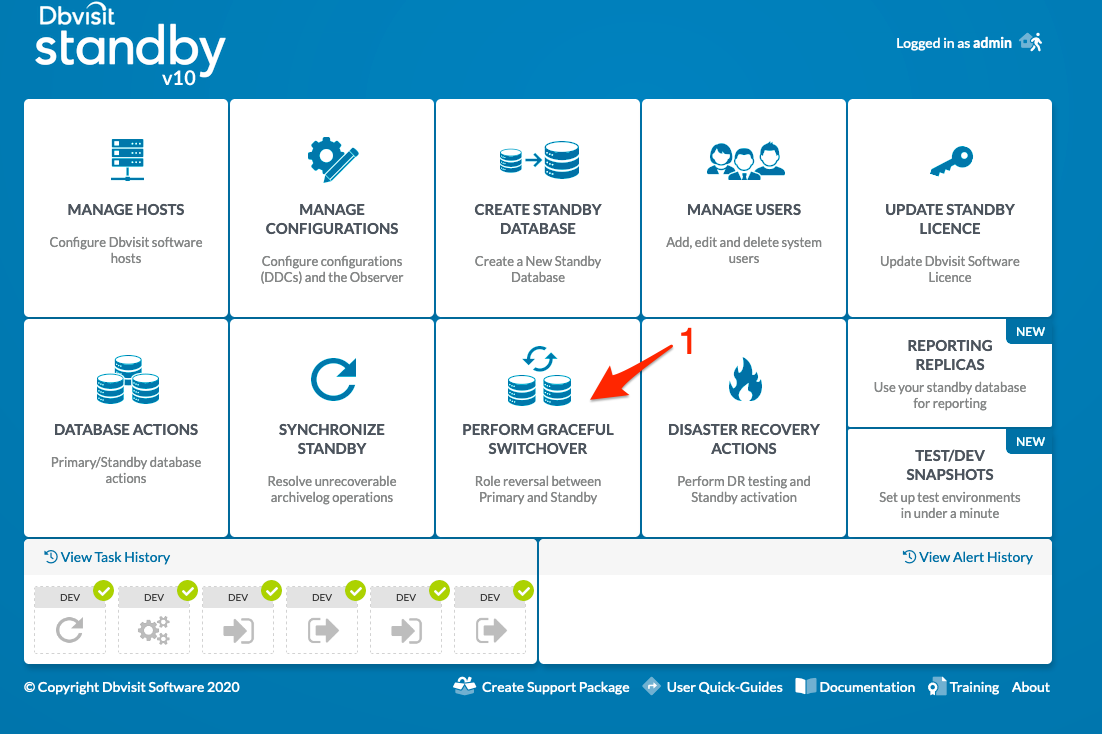
Step 1: Initiate the GS process by clicking the Perform Graceful Switchover button on the main page.
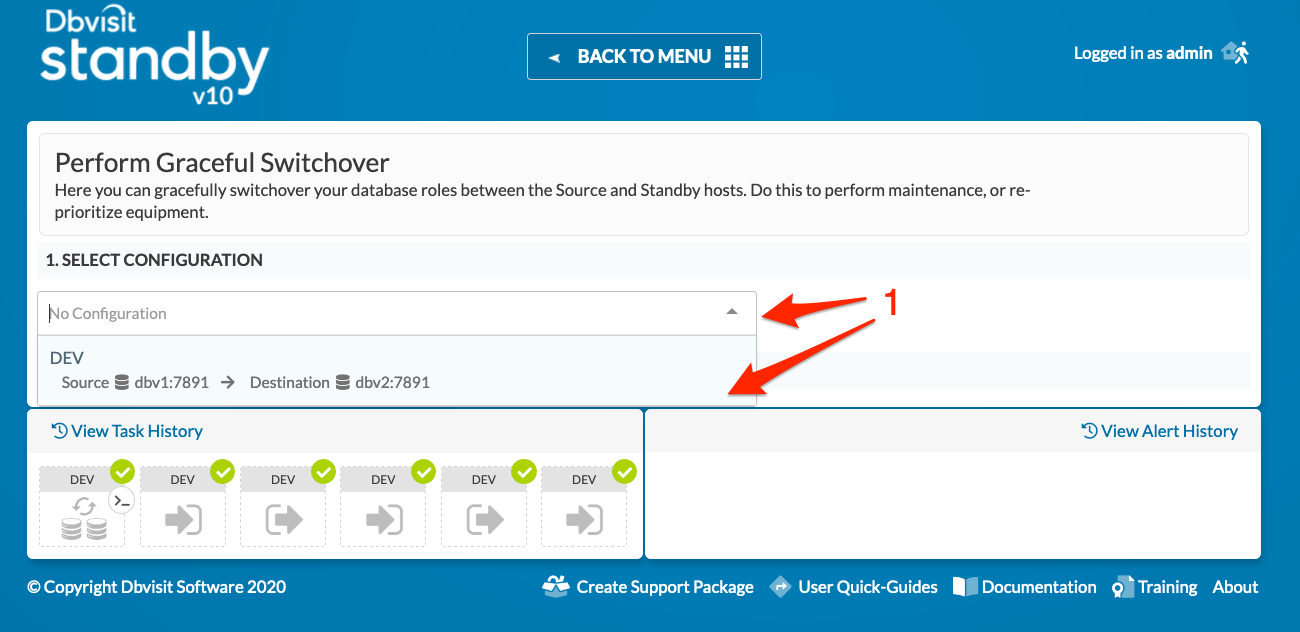
Step 2: Select the Configuration/DDC to work with [1]. The source is dbv1 and the target is dbv2
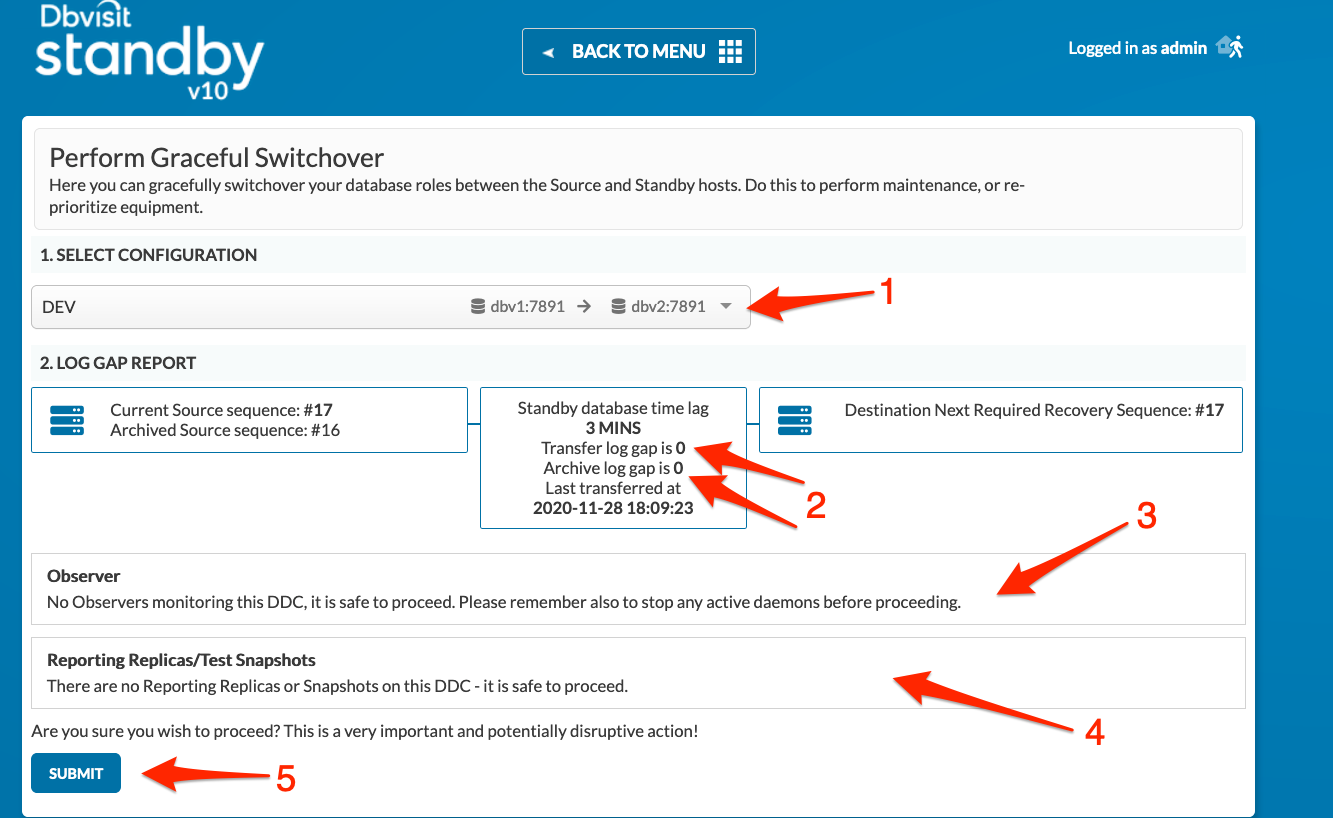
Step 3: Once the desired Configuration/DDC is selected [1], the system will run a Log Gap Report [2]. This is important because a Graceful Switchover can only be performed if the Archive Log Gap between your two Hosts is zero! If the log gap is more than zero, a warning message will be displayed, and you will be unable to proceed. NOTE: On RAC systems, a GS is possible when the Archive Log Gap is either 0 or 1. Before starting the GS process we need to confirm whether the observer is monitoring the configuration or not. If the observer is monitoring, please stop the monitoring. The GS will not proceed when the observer is monitoring the DDC [ 3 ]. The same applies to Reporting replicates and snapshots [ 4 ]
If the operation is possible, clicking the Submit button [5] will begin the process. Please note the warning message above this button - GS is an important process, and because it swaps the roles of the Source and Destination Hosts, will completely change how your environment works. It is possible to use GS twice to again reverse your environment back to its original configuration, however, this will take a considerable amount of time. In short, please ensure you use the GS process responsibly.
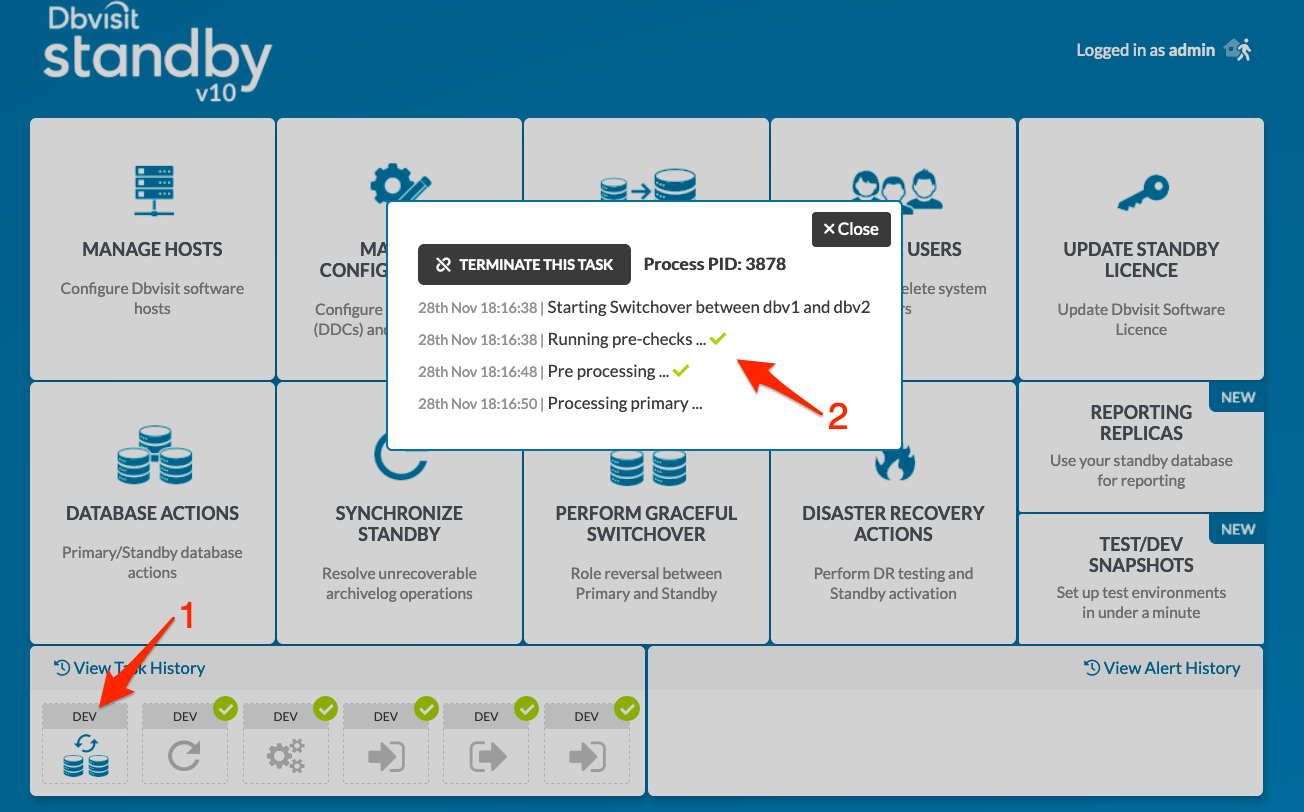
Step 4: After the GS process is underway, you will be able to track it as a separate Task in the Active Task List [1].
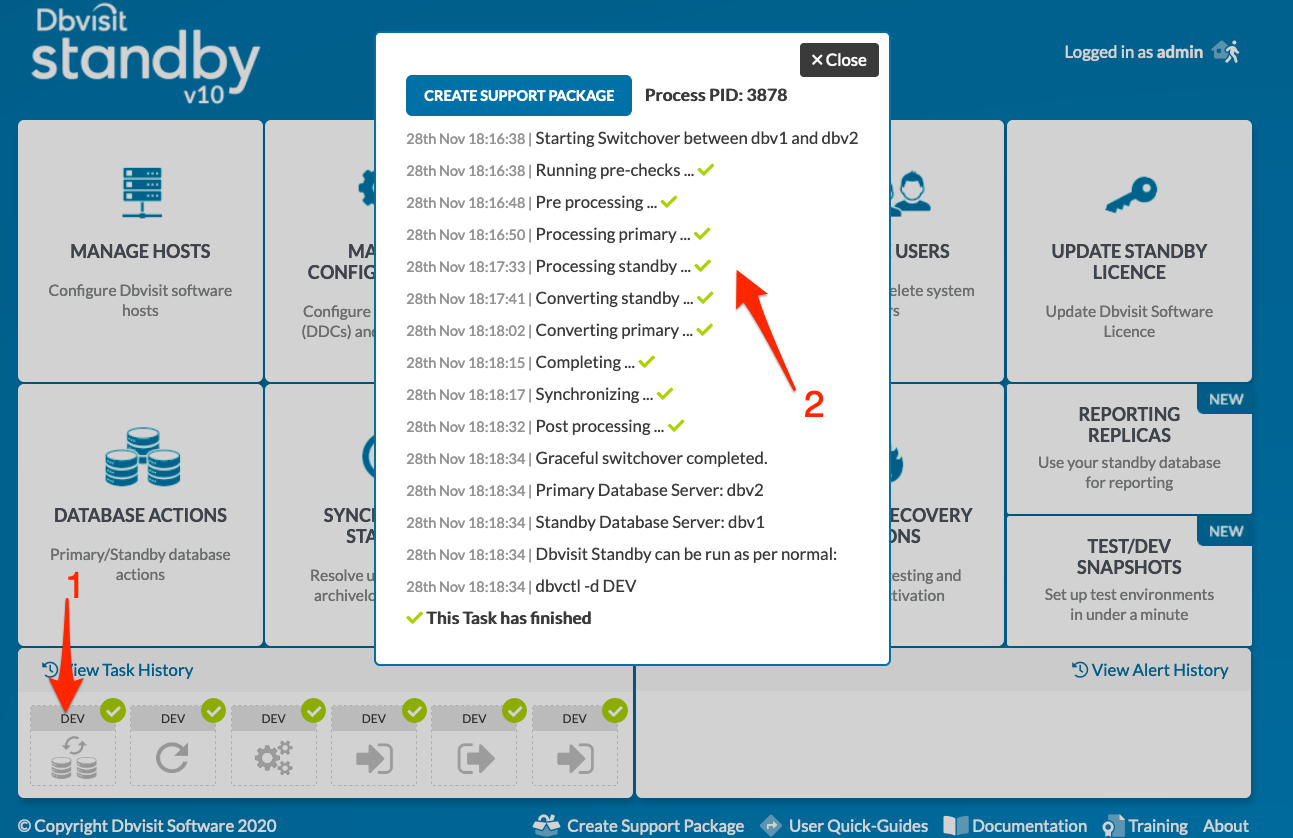
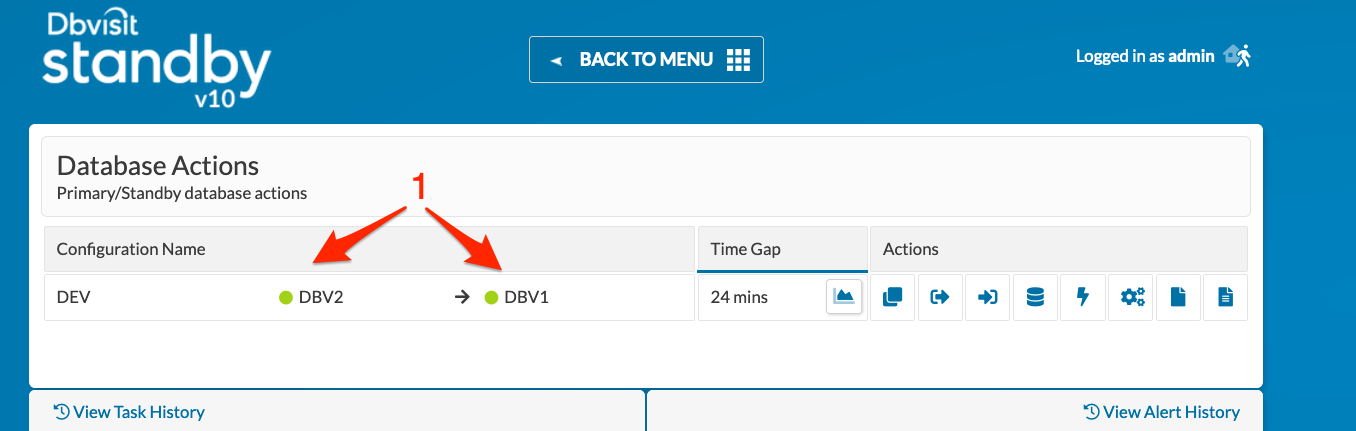
Step 5: Once the GS process is complete, the Source and Destination Hosts for your chosen Configuration/DDC will switch. You can confirm this by going to the Configurations page and taking note of the Source and Destination host entries [1]. The new source is dbv2 and the standby is dbv1
4. Video - How To Perform A Graceful Switchover
Part 1
Part 2