Dbvisit Standby Logging
- Anton Els (Deactivated)
- Anna Macnaughtan (Deactivated)
Dbvisit Standby Log Files
Because Dbvisit Standby runs in the background, log files are an integral part of Dbvisit Standby. There are two log files:
- The Dbvisit Standby log file (dbvisit.hist)
- The Dbvisit Standby archive management module (AMM) log file (<DDC>_arch_management.log)
The Dbvisit Standby log file will contain a new entry every time Dbvisit Standby is executed. The AMM log file will contain a new entry every time the archive log files are managed by Dbvisit Standby.
The location of the log files are DBVISIT_BASE/standby/log and DBVISIT_BASE_DR/standby/log. To overwrite default locations set LOGDIR and LOGDIR_DR in the DDC file (not recommended).
Please note that the use or set of the LOGDIR and LOGDIR_DR in the DDC file is not recommended. Using the default locations are recommended.
Log files are created on both the primary and the standby server. Normal logging is kept to a minimum to allow easy integration with monitoring tools. Once an error is detected, logging is elaborate.
An example of the Dbvisit Standby log file:
 200901281305 - 1 Log transfer(s) for w102n completed. Last sequence was 253. (pid 3454)
 200901281315 - 1 Log transfer(s) for w102n completed. Last sequence was 254. (pid 557)
 200901281325 - 1 Log transfer(s) for w102n completed. Last sequence was 255. (pid 4456)
 200901281335 - 1 Log transfer(s) for w102n completed. Last sequence was 256. (pid 1546)
 200901281345 - 1 Log transfer(s) for w102n completed. Last sequence was 257. (pid 8903)
 200901281355 - 1 Log transfer(s) for w102n completed. Last sequence was 258. (pid 8048)
 200901281345 - 1 Log transfer(s) for w102n completed. Last sequence was 259. (pid 9074)
 200901281355 - 1 Log transfer(s) for w102n completed. Last sequence was 260. (pid 8095)
 200901281405 - 1 Log transfer(s) for w102n completed. Last sequence was 261. (pid 887)
 200901281415 - Schedular message sent: Dbvisit Standby Database Process is running on win2003se-01 (pid 5567)
 200901281415 - 1 Log transfer(s) for w102n completed. Last sequence was 262. (pid 5567)
 200901281425 - 1 Log transfer(s) for w102n completed. Last sequence was 263. (pid 905)
 200901281435 - 1 Log transfer(s) for w102n completed. Last sequence was 264. (pid 9845)
 200901281425 - 1 Log transfer(s) for w102n completed. Last sequence was 265. (pid 2353)
 200901281435 - 1 Log transfer(s) for w102n completed. Last sequence was 266. (pid 5577)
 200901281542 - Record archive log gap: 0 (pid 2345)
 200901281545 - 1 Log transfer(s) for w102n completed. Last sequence was 267. (pid 59098)
 200901281555 - 1 Log transfer(s) for w102n completed. Last sequence was 268.(pid 4345)
 200901281542 - Record archive log gap: 1(pid 4567)
 200901281545 - 1 Log transfer(s) for w102n completed. Last sequence was 269. (pid 4567)
Where w102n is the name of the database
The process id (pid) is shown for each entry. This makes it easy to identify the Dbvisit Standby trace file generated for that entry. For more information about Dbvisit Standby trace files please see the Dbvisit Standby trace files section.
The log files can be read by monitoring tools to provide another level of automatic notification.
 To view the log files through the web-based interface go to Home > Logs
Click on Dbvisit log and click View:
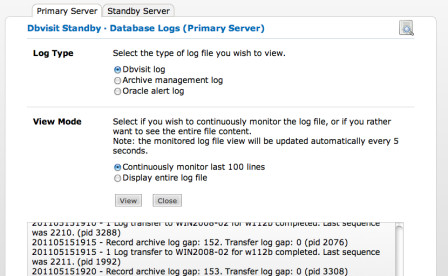
Different logs can be viewed including:
- Dbvisit logs on both primary and standby servers
- Archive management logs on primary and standby servers.
- Oracle alert log on primary and standby servers.
Integrating with monitoring tools
The Dbvisit Standby log files can be integrated with existing monitoring tools and the following keywords should be alerted on:
- Error
- Warning (This can be turned off by setting ALERT_ON_WARNING = N)
Maintaining the log files
The Dbvisit Standby log files are automatically maintained on both the primary and the standby servers.