Scheduling with Dbvserver scheduler
- KrupeshD (Deactivated)
- Arjen Visser
Dbvisit Standby needs to be scheduled on the primary server and the standby server. Since Dbvisit version 5.1.19 it is possible to schedule Dbvisit only on the primary server using the INITIATE_DBVISIT_ON_STANDBY variable. Ensure you understand the implication before using this feature. See variable INITIATE_DBVISIT_ON_STANDBY for more details. This can be done using either of the following methods:
- Windows Scheduler when running Dbvisit Standby on Windows, or
- Cron when running Dbvisit Standby on Linux or Unix, or
- Using Dbvserver Scheduler included with Dbvisit Standby software for all platforms.
This section describes scheduling Dbvisit Standby with Dbvserver Scheduler for all platforms. For other schedulers, please see the relevant sections.
Important: Dbvserver needs to be running in order for the scheduler to be active.
To access the scheduler:
 Home > Run > Run Schedule
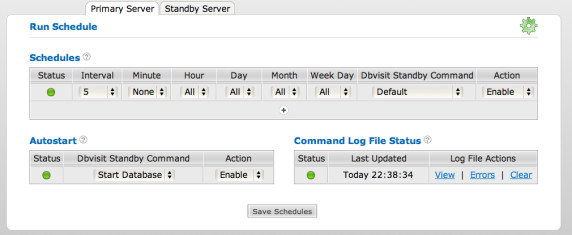
Set the desired schedule, select Enable and click Save Schedule. Full help is available on the different scheduling options by clicking the question mark (?).
The Standby database schedule can be set by accessing the Standby Server tab. Dbvserver must be running on the standby server in order to activate the standby server schedule.
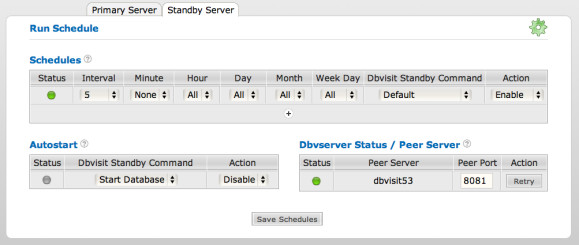
Autostart
The Autostart schedule can be set if it is required to have the databases started as soon as Dbvserver is started. Dbvserver must be configured to start automatically when the server is started.
On Unix/Linux this can be done by creating an init.d script to auto start Dbvserver at boot time. Example template init.d files can be found in:
/usr/local/dbvisit/dbvserver/etc/init.dOn Windows, this can be done by setting the Startup Type on the Dbvserver service to automatic:
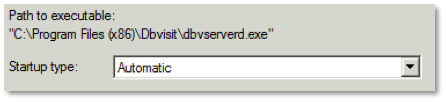
Command Log File Status
The scheduler log file can be viewed to verify the correct functioning of the scheduler.
Backing up the schedule
The Dbvserver schedule is saved locally in:
/usr/local/dbvisit/dbvserver/etc/scheduler.conf
By backing up this file, a backup is made of the Dbvserver schedule.